> ## Documentation Index
> Fetch the complete documentation index at: https://docs.datawizz.ai/llms.txt
> Use this file to discover all available pages before exploring further.
# Rate Limits
> Control API usage with fine-grained rate limits for keys and users
# Rate Limits
Rate limits provide fine-grained control over API usage, allowing you to prevent abuse and manage resource consumption effectively. The system supports both key-level and user-level limits with multiple resolution types.
## Overview
Rate limits in the Datawizz AI Gateway offer:
* **Key-level limits**: Apply to the entire API key regardless of user
* **User-level limits**: Apply per individual user (requires Client Access with JWT)
* **Multiple resolutions**: MINUTE, HOUR, DAY, MONTH
* **Multiple limit types**: REQUESTS\_LIMIT, TOKENS\_LIMIT
* **Parallel enforcement**: All configured limits are checked simultaneously
## Configuring Rate Limits
Rate limits are managed at the Project Key level - so you can set different limits for different keys (e.g. production key can have different limits than development key).
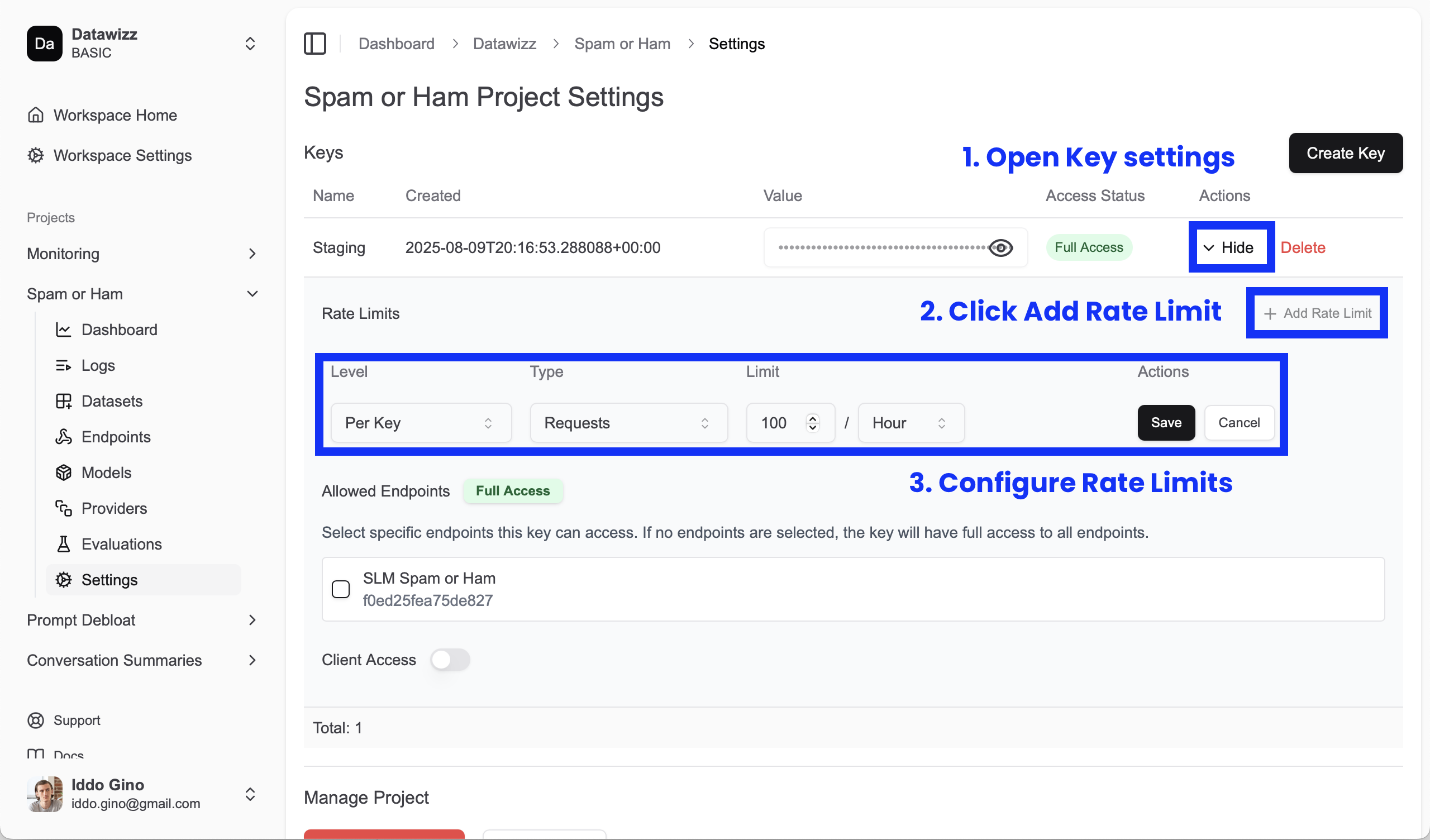 To add a rate limit to a key:
1. Go to the **Settings** page of your project.
2. Select the key you want to configure.
3. Click on **Add Rate Limit**.
4. Configure the limit type, resolution, and value.
5. Save the changes.
The limit will be applied immediately and enforced on all requests using that key.
The system collects usage metrics even before you configure rate limits. So when adding a rate limit, it'll take into account all historical usage data.
## Limit Types
### Request Limits
Controls the number of API requests that can be made within a time window.
**Example**: 100 requests per hour
* Tracks each API call as 1 request
* Useful for preventing API abuse and managing load
### Token Limits
Controls the total number of tokens (input + output) consumed within a time window.
**Example**: 10,000 tokens per day
* Tracks actual LLM token usage
* Useful for cost control and resource management
## Resolution Types
Usage tracking is aligned to clock and calendar time -- so an hourly limit resets every hour, a daily limit resets at midnight (UTC), and a monthly limit resets at the start of each month. The system supports the following resolutions:
| Resolution | Description | Use Case |
| ---------- | ----------------- | ---------------------------------------- |
| `MINUTE` | Per-minute limits | Burst protection, real-time applications |
| `HOUR` | Per-hour limits | Standard API rate limiting |
| `DAY` | Per-day limits | Daily usage quotas |
| `MONTH` | Per-month limits | Billing period controls |
## Rate Limit Levels
### Key-Level Limits
Apply to the entire API key, regardless of which user makes the request.
**Use cases:**
* Overall API key quotas
* Preventing single key abuse
* Basic rate limiting for simple use cases
### User-Level Limits
Apply individually to each user identified via JWT (requires Client Access enabled).
**Use cases:**
* Per-user quotas in multi-tenant applications
* Fair usage across different users
* Individual user billing controls
**Requirements:**
* When using a project key without Client Access, you must pass a User ID in the request metadat (`{"user": ""}`).
* When using a project key with Client Access, the User ID is extracted from the JWT claims:
* `sub` (standard claim)
* `user_id` (custom claim)
* `userId` (custom claim)
## Rate Limit Enforcement
### Parallel Checking
All configured rate limits are checked simultaneously. **If ANY limit is exceeded, the request is blocked.**
**Example scenario:**
```
Configured limits:
- Key-level: 1,000 requests per hour
- User-level: 100 requests per hour
If user has made 99 requests this hour:
- User limit: 99/100 ✅ (allowed)
- Key limit: 850/1,000 ✅ (allowed)
- Result: Request allowed
If user has made 100 requests this hour:
- User limit: 100/100 ❌ (exceeded)
- Key limit: 851/1,000 ✅ (allowed)
- Result: Request blocked (429 status)
```
### Response Headers
Rate limit information is included in response headers:
```http theme={null}
X-RateLimit-Requests-HOUR-Limit: 100
X-RateLimit-Requests-HOUR-Remaining: 73
X-RateLimit-Tokens-DAY-Limit: 10000
X-RateLimit-Tokens-DAY-Remaining: 8547
```
**Header format**: `X-RateLimit-{TYPE}-{RESOLUTION}-{Limit|Remaining}`
## Usage Tracking
The system proactively tracks usage across **ALL** possible combinations to enable flexible rate limit configuration:
### Key-Level Tracking
Always tracks 8 combinations for every request:
* REQUESTS\_LIMIT: MINUTE, HOUR, DAY, MONTH (4 entries)
* TOKENS\_LIMIT: MINUTE, HOUR, DAY, MONTH (4 entries)
### User-Level Tracking
When JWT user ID is present, tracks additional 8 combinations:
* Same 8 combinations but scoped to the specific user
* **Total: 16 KV entries per request** (8 key + 8 user)
**Benefits:**
* Add new rate limits anytime with historical data already available
* Flexible configuration changes without losing tracking history
* Supports complex rate limiting scenarios
## Known Limitations
### Header Collisions
When multiple rate limits have the same type and resolution, response headers will collide:
**Problematic configuration:**
```
- Key-level: 100 REQUESTS per HOUR
- User-level: 50 REQUESTS per HOUR
```
**Result:**
* Both limits are enforced correctly ✅
* Headers only show the last processed limit ❌
* Client sees: `X-RateLimit-Requests-HOUR-Limit: 50` (user-level)
* Client doesn't see key-level limit headers
**Workarounds:**
* Use different resolutions (HOUR vs DAY)
* Use different types (REQUESTS vs TOKENS)
* Be aware that enforcement works correctly despite header visibility issues
## Error Responses
### Rate Limit Exceeded
```http theme={null}
HTTP/1.1 429 Too Many Requests
Content-Type: application/json
X-RateLimit-Requests-HOUR-Limit: 100
X-RateLimit-Requests-HOUR-Remaining: 0
{
"error": "Rate limit exceeded: 100 requests per hour"
}
```
## Troubleshooting
### Common Issues
**Rate limits not working:**
* Verify rate limits are properly configured and enabled
* Check that project key has rate limits associated
* Ensure usage tracking KV store is accessible
**Unexpected rate limit blocks:**
* Check if multiple limits are configured (all must pass)
* Verify user-level limits if Client Access is enabled
* Review recent usage patterns and current limit values
**Missing rate limit headers:**
* May indicate header collision with multiple same-type limits
* Check rate limit configuration for duplicates
* Enforcement still works even if headers are missing
**User-level limits not working:**
* Verify Client Access is enabled on the project key
* Ensure JWT contains valid user identifier (`sub`, `user_id`, or `userId`)
* Check that JWT is properly signed and validated
To add a rate limit to a key:
1. Go to the **Settings** page of your project.
2. Select the key you want to configure.
3. Click on **Add Rate Limit**.
4. Configure the limit type, resolution, and value.
5. Save the changes.
The limit will be applied immediately and enforced on all requests using that key.
The system collects usage metrics even before you configure rate limits. So when adding a rate limit, it'll take into account all historical usage data.
## Limit Types
### Request Limits
Controls the number of API requests that can be made within a time window.
**Example**: 100 requests per hour
* Tracks each API call as 1 request
* Useful for preventing API abuse and managing load
### Token Limits
Controls the total number of tokens (input + output) consumed within a time window.
**Example**: 10,000 tokens per day
* Tracks actual LLM token usage
* Useful for cost control and resource management
## Resolution Types
Usage tracking is aligned to clock and calendar time -- so an hourly limit resets every hour, a daily limit resets at midnight (UTC), and a monthly limit resets at the start of each month. The system supports the following resolutions:
| Resolution | Description | Use Case |
| ---------- | ----------------- | ---------------------------------------- |
| `MINUTE` | Per-minute limits | Burst protection, real-time applications |
| `HOUR` | Per-hour limits | Standard API rate limiting |
| `DAY` | Per-day limits | Daily usage quotas |
| `MONTH` | Per-month limits | Billing period controls |
## Rate Limit Levels
### Key-Level Limits
Apply to the entire API key, regardless of which user makes the request.
**Use cases:**
* Overall API key quotas
* Preventing single key abuse
* Basic rate limiting for simple use cases
### User-Level Limits
Apply individually to each user identified via JWT (requires Client Access enabled).
**Use cases:**
* Per-user quotas in multi-tenant applications
* Fair usage across different users
* Individual user billing controls
**Requirements:**
* When using a project key without Client Access, you must pass a User ID in the request metadat (`{"user": ""}`).
* When using a project key with Client Access, the User ID is extracted from the JWT claims:
* `sub` (standard claim)
* `user_id` (custom claim)
* `userId` (custom claim)
## Rate Limit Enforcement
### Parallel Checking
All configured rate limits are checked simultaneously. **If ANY limit is exceeded, the request is blocked.**
**Example scenario:**
```
Configured limits:
- Key-level: 1,000 requests per hour
- User-level: 100 requests per hour
If user has made 99 requests this hour:
- User limit: 99/100 ✅ (allowed)
- Key limit: 850/1,000 ✅ (allowed)
- Result: Request allowed
If user has made 100 requests this hour:
- User limit: 100/100 ❌ (exceeded)
- Key limit: 851/1,000 ✅ (allowed)
- Result: Request blocked (429 status)
```
### Response Headers
Rate limit information is included in response headers:
```http theme={null}
X-RateLimit-Requests-HOUR-Limit: 100
X-RateLimit-Requests-HOUR-Remaining: 73
X-RateLimit-Tokens-DAY-Limit: 10000
X-RateLimit-Tokens-DAY-Remaining: 8547
```
**Header format**: `X-RateLimit-{TYPE}-{RESOLUTION}-{Limit|Remaining}`
## Usage Tracking
The system proactively tracks usage across **ALL** possible combinations to enable flexible rate limit configuration:
### Key-Level Tracking
Always tracks 8 combinations for every request:
* REQUESTS\_LIMIT: MINUTE, HOUR, DAY, MONTH (4 entries)
* TOKENS\_LIMIT: MINUTE, HOUR, DAY, MONTH (4 entries)
### User-Level Tracking
When JWT user ID is present, tracks additional 8 combinations:
* Same 8 combinations but scoped to the specific user
* **Total: 16 KV entries per request** (8 key + 8 user)
**Benefits:**
* Add new rate limits anytime with historical data already available
* Flexible configuration changes without losing tracking history
* Supports complex rate limiting scenarios
## Known Limitations
### Header Collisions
When multiple rate limits have the same type and resolution, response headers will collide:
**Problematic configuration:**
```
- Key-level: 100 REQUESTS per HOUR
- User-level: 50 REQUESTS per HOUR
```
**Result:**
* Both limits are enforced correctly ✅
* Headers only show the last processed limit ❌
* Client sees: `X-RateLimit-Requests-HOUR-Limit: 50` (user-level)
* Client doesn't see key-level limit headers
**Workarounds:**
* Use different resolutions (HOUR vs DAY)
* Use different types (REQUESTS vs TOKENS)
* Be aware that enforcement works correctly despite header visibility issues
## Error Responses
### Rate Limit Exceeded
```http theme={null}
HTTP/1.1 429 Too Many Requests
Content-Type: application/json
X-RateLimit-Requests-HOUR-Limit: 100
X-RateLimit-Requests-HOUR-Remaining: 0
{
"error": "Rate limit exceeded: 100 requests per hour"
}
```
## Troubleshooting
### Common Issues
**Rate limits not working:**
* Verify rate limits are properly configured and enabled
* Check that project key has rate limits associated
* Ensure usage tracking KV store is accessible
**Unexpected rate limit blocks:**
* Check if multiple limits are configured (all must pass)
* Verify user-level limits if Client Access is enabled
* Review recent usage patterns and current limit values
**Missing rate limit headers:**
* May indicate header collision with multiple same-type limits
* Check rate limit configuration for duplicates
* Enforcement still works even if headers are missing
**User-level limits not working:**
* Verify Client Access is enabled on the project key
* Ensure JWT contains valid user identifier (`sub`, `user_id`, or `userId`)
* Check that JWT is properly signed and validated